Handwriting OCR: Convert Handwriting to Text
Upload a photo of handwritten notes. Turn it into editable text, correct the draft, and copy or download TXT.
- 1Upload
- 2Convert
- 3Download
Image input · TXT output · Review handwriting for errors. Usage limits apply.
How to convert handwriting to text with OCR
- Step 1
Upload a handwritten image
Upload one JPG, JPEG, PNG, BMP, TIF, or TIFF image. Photograph the page straight on, crop the background, and keep every line in focus.
- Step 2
Convert and review the text
Select Convert handwriting to text. Compare the editable transcription with the original, then correct names, numbers, line order, and unclear words.
- Step 3
Copy or download TXT
Copy the corrected text or download a UTF-8 TXT file. Paste the text into Word, a notes app, or your document editor. Usage and download limits apply.
Online handwriting OCR for your notes
Handwriting OCR converts handwritten words in an image into editable digital text. It is also called handwritten text recognition (HTR). AI OCR for handwriting-to-text conversion creates a draft rather than a verified record. Use the tool above for notes, lists, and photographed handwriting, then review the draft before reusing it.
Handwritten notes to text
Transcribe notebook pages, meeting notes, and short letters without retyping every word.
Review before exporting
Edit the recognized text in place. Check names, dates, and numbers against the original image.
Use on Mac or mobile
Open this browser tool on a Mac, Windows PC, or phone. No desktop handwriting OCR app is required.
Image input, editable text output
This handwriting-to-text converter accepts JPG, JPEG, PNG, BMP, TIF, and TIFF images and produces editable text with TXT download. For handwriting OCR PDF to Word, first save a scanned PDF page as an image, recognize it here, and paste the corrected text into Word. Direct PDF upload and DOCX export are not available on this page.
Need spreadsheet cells from a handwritten table?
For stock sheets, ledgers, or numeric records, use our image to table converter to retain rows and columns, or photo to Excel for XLSX, XLS, and CSV output. Review handwritten amounts, decimal points, minus signs, and totals.
The image to Excel table workflow explains how to prepare a scan and check cell alignment.
Free handwriting OCR: try a page first
The converter uses the site's existing free allowance and credit limits. Check current plans and usage limits before a large job. A free online handwriting OCR trial should be evaluated on the corrected text and the export you need, not just its first preview.
If you are comparing the best free handwriting OCR options, test the same clear note, cursive page, and difficult sample in each tool. Transkribus publishes its free plan and credit rules; Pen to Print and HandwritingOCR describe their transcription and export workflows. Verify their current allowances before uploading.
For handwriting OCR on Mac, this online tool works in a modern browser. Local open-source tools require installation and computing resources; the OCR for Mac page covers our separate screenshot-to-spreadsheet workflow.
Handwriting OCR open source: models and GitHub resources
For a local handwriting OCR model, recognition and page layout are separate problems. A line recognizer needs cropped lines; a full-page workflow must also detect lines and reconstruct reading order.
TrOCR for handwritten text lines
Microsoft's TrOCR handwritten checkpoint is fine-tuned on IAM and intended for single text-line images. Evaluate it on your own script and writer. See the official TrOCR GitHub repository for implementation resources.
Why Tesseract is a poor default for cursive
The Tesseract FAQ explains that it is designed for printed text and performs poorly on handwriting. A large printed-language list does not make it a reliable cursive recognition model.
There is no defensible universal “best local open-source cursive HTR model” without a matched test set. For repeated historical handwriting, Transkribus documents custom model training; compare that workflow with maintaining your own local pipeline.
Russian, Spanish, Danish, and Sinhala handwriting OCR
Check the provider's handwritten language list for the exact model version. Support for printed characters does not establish support for cursive in the same language.
- Russian handwriting OCR: Microsoft's Document Intelligence v4 documentation lists Russian for handwritten Read extraction. Test connected Cyrillic letters and unfamiliar names on representative pages.
- Spanish handwriting OCR: the same documentation lists Spanish. Review accents, personal names, and local abbreviations.
- Danish and Sinhala handwriting OCR: neither appears in that documented handwritten Read list. Look for a provider or custom model with explicit handwriting evidence for the script.
Source: Microsoft's versioned OCR language support documentation. These are that provider's documented capabilities, not a language guarantee for JPG to Excel.
A reusable handwriting OCR review template
Before buying a plan, compare two tools on the same small set: a clear note, a cursive page, a numeric table, and a difficult page. Record what changed and how long correction took. This is a suggested pilot, not a benchmark we have run.
Track the cost of getting to a usable result
The worksheet includes page IDs, ground-truth transcription, error counts, timing, export checks, and a prompt that marks uncertainty. Fill it with your own pages to create a reproducible comparison.
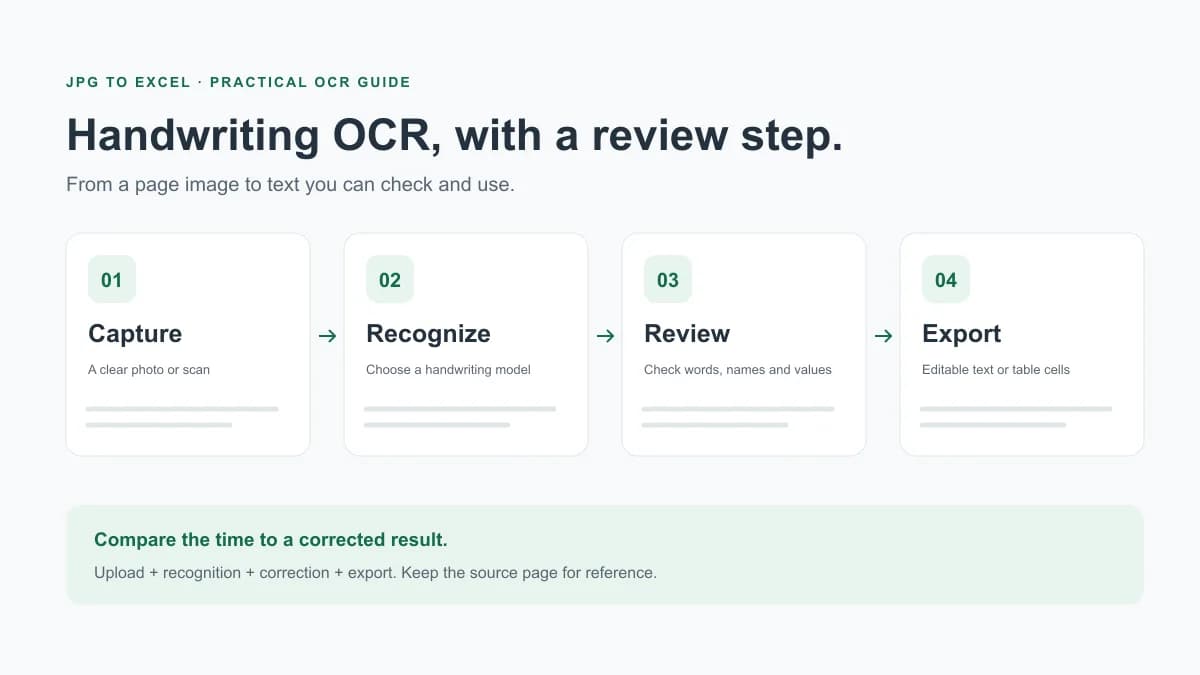
Total time = upload + recognition + correction + export
CER = (substitutions + deletions + insertions) / reference characters
WER = (substitutions + deletions + insertions) / reference words
Use a manually checked reference and the same rules for punctuation, case, and spaces. For tables, also count correct rows and cells; a low text error rate can still hide a misplaced value.
Download review template (.txt)Accuracy problems worth checking first
- Joined cursive letters, overwriting, faded ink, and text crossing ruled lines.
- Names and abbreviations that a model may replace with a plausible word.
- Digit pairs such as 1/7 and 0/6, decimal separators, and negative amounts.
- Paragraph or column order that changes the meaning of otherwise correct words.
Handwriting OCR questions, answered
Can OCR read handwriting?
Yes. Handwriting OCR uses recognition models trained for handwritten text to turn a photo or scan into editable text. Clear lettering is easier than overlapping cursive, faded ink, or unfamiliar scripts. Review names, numbers, and uncertain words against the source.
Can OCR convert handwriting to text?
Yes. Photograph or scan the page, run a model with handwriting support, compare the draft with the original, and export editable text. Choose TXT or Word for notes and a table extraction workflow for spreadsheet cells.
Is OCR used for converting human handwriting to text?
Yes. OCR handwriting-to-text tools recognize written characters in images. This is also called handwritten text recognition (HTR). Unlike digital pen recognition, it works from a photograph or scanned page rather than pen strokes.
Which OCR is best for handwriting?
Choose by document and output: a transcription service for notes and Word files, Transkribus for historical collections and model training, or a handwriting model such as TrOCR for a local development workflow. Test the same representative pages and compare corrected output before choosing.
Can I use handwriting OCR for free?
This tool uses JPG to Excel’s existing free allowance and credit limits. Check the pricing page for current limits and download access. Free does not mean unlimited. Local open-source models require setup and computing resources.
Can OCR convert handwritten PDF to Word?
This page accepts images and exports TXT. Save a handwritten PDF page as an image, recognize it here, then paste the reviewed text into Word. For direct PDF input and DOCX export, choose a service that supports both. Inserting a scan into Word alone does not transcribe it.
Can ChatGPT OCR handwriting?
With image input available, you can ask ChatGPT to transcribe a clear photo of handwritten text. Treat the result as a draft: vision models can misread small, rotated, or non-Latin text. Ask it to mark uncertain words instead of guessing, then check the transcription against the image.
Source: OpenAI's image-input limitations. Image transcription is a draft, not a verified record.
Can AI replace humans at handwriting OCR, and which is faster?
AI can create a first transcription, but difficult handwriting still needs human review. Compare total time for uploading, recognition, correction, and export. A faster first result is not necessarily faster overall if names, numbers, or line order need substantial correction.
Is there handwriting OCR for Mac?
Browser-based handwriting OCR services can be used on a Mac without installing a desktop app. Check that the service supports your document language and required export format. A local open-source workflow requires compatible dependencies and enough computing resources.
Convert your handwritten notes to text
Start with one clear image and review the transcription before exporting.
Upload a handwritten image